
Reunion for iPhone Features
Information you can send to the iPhone...
- Multiple family files can be transferred to the iPhone.
- All or marked people.
- Person and family information including names, events, notes, facts, flags, and contact info.
- Pictures linked to a person: the preferred, the first 5, 10, 15, or all.
- Bookmarks.
- Sources.
- Logs.
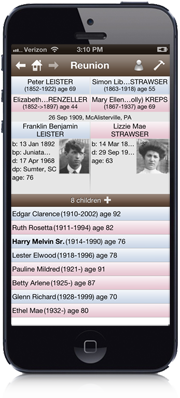
Family View Display - similar to the Mac version of Reunion
- Tap to navigate.
- Preferred pictures appear for people.
- Resizable child list.
- , and buttons.
- Tap a husband/wife button to show the Person menu, including spouses, siblings, children, parents (if multiple parents are linked to a person), and other features.
- A red button indicates that a person has multiple spouses.
- Customize the fields/field order appearing under names.
- Customizable gesture shortcuts.
Multimedia
- Preferred picture display in the Family view.
- View full-screen pictures.
- View multiple pictures of a person with swiping gesture.
- View a slide show for a person.
- Use your device's camera to take pictures and link them to people in your family file.
Tree View
- Starts with a source couple, goes up 3 generations and down 2.
- Pictures appear in boxes.
- Pinch to zoom in and out.
- Drag to scroll.
- Tap a box to change the source couple for the tree.
- Tap the source couple to open their family record.
- , , , and buttons.
- Settings to show/hide relationships and event places in boxes.
- Email trees (in PDF format).
People List
- People are sorted by last name, first name, birth date.
- Searchable on last name, first name, married name, soundex and person id number.
- Settings to show all, males, females and subsets, such as people with pictures, people with multiple spouses, people with no parents, etc.
Bookmarks
- People are sorted by last name, first name, birth date.
- People can be added to and removed from the Bookmarks.
Places
- Search for places and display a list of people whose records include an event with the desired place.
Person Menu
- Show the spouses, children, siblings, and parents (if there are multiple parents) of a person.
- Edit a person's information.
- Edit links (to spouses, children and parents).
- Find Relatives.
- Find Treetops.
- Add to (or Remove) a person from Bookmarks.
Treetops
- Similar feature as the Mac version of Reunion.
- Tap to navigate.
Ages
- Similar feature as the Mac version of Reunion.
- Tap to navigate.
Sources List
- View all the sources sorted by source number.
- Edit existing sources.
- Add new sources.
- When citing a source, a handy list of the 12 most recently used sources will appear.
Logs
- View all the logs in the family file.
- Edit existing logs.
- Add new logs.
Preferences
- Select and order fields for the Family view.
- Enable display of relationship and event places in the Tree view.
- Set the format for dates.
- Customize gesture shortcuts.
Manual Included
- Drag to scroll.
- , , and buttons.
Editing
- Data can be edited and synced back to the family file on the Mac version of Reunion.
- Add, change, and delete fields (names, addresses, facts, events, notes and flags).
- Add new children, spouses, and parents.
- Add unrelated people.
- Change child status and order.
- Link to existing children and spouses.
- Delete people.
- Remove links.
- Add new logs and sources.
- Enter and convert Hebrew dates.
General
- Every window in the app supports the device's portrait and landscape orientations.
- Tap and hold a person's name in any list/view to show more details about a person, without closing the list/view.
- Tap and hold an event or fact in the Edit Person or Edit Family window to see all of the data for that event.
- Tap and hold a source in the Sources List to see more of the source text.
- Tap the relationship field in the Edit Person window to see (and optionally go to) the source person for whom relatives have been identified.
- Optimized graphics for Retina displays.